Threads and comments
Thread replies and follow-up comments after the main post, per network, and delays between parts in the OpenQuok social scheduler.
Connect your agent today
Draft from chat, review in your calendar, and publish only what you approve.
Follow-up comments
Thread replies and follow-up comments after the main post — with delays between parts.
A post can have more than one part: a main post (caption plus media) and optional parts in Follow-up comments.
Those parts publish as thread replies on Threads and X, and as comments on Instagram, LinkedIn, and Facebook. They can be a thread reply, or a comment on your own post.
Note
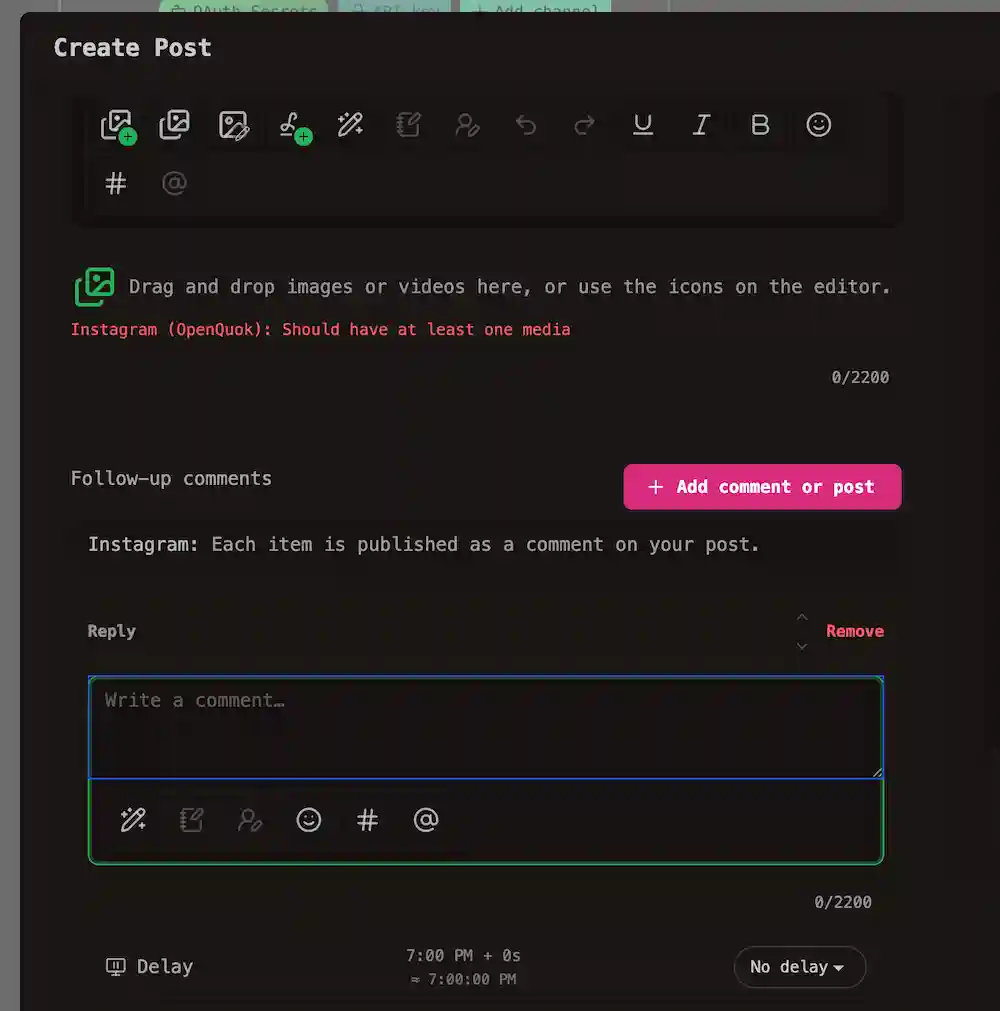
Where in the composer
| Area | What you do there |
|---|---|
| Main caption + media | Write the post that publishes first — see Writing the post and Media |
| Follow-up comments | Thread replies or comments below the caption when at least one supported channel is selected — each row has its own text field, reply toolbar, optional media (network-dependent), and Delay |
| Settings (purple accordion) | Thread finisher, delayed same-account engagement (Threads), and cross-account plugs |
The Follow-up comments panel appears when your selection includes Threads, X, Instagram, LinkedIn, or Facebook.
Adding a follow-up
Where: In the post editor, open the Follow-up comments section. Use the pink Add … button below Drag & drop section.
The button label follows the focused channel:
| Button | Meaning |
|---|---|
| Add more thread | The network publishes follow-up comments as same-account thread replies (e.g. Threads, X). |
| Add comment | Follow-up comments publish as comments on the main post (e.g. Instagram). |
| Add comment or post | The channel or platform supports both styles. |
Each follow-up comment row has its own text field, a reply toolbar under the text area, a Delay control, and row actions:
| Control | What it does |
|---|---|
| Reply toolbar | Attach media (when the network allows), AI Writer / Summarize / Sound more human, emoji, hashtag, and mention — see below |
| Up / down (chevrons) | Swap a row with the one above or below — publish order follows the list |
| Remove | Delete that row |
Reply toolbar
Each follow-up comment row includes a toolbar, but limited to actions that work on thread replies or comments:
| Tool | Follow-up comments |
|---|---|
| Attach from device | Threads, X, and Facebook (Facebook: one image per comment, no video). Not shown on Instagram or LinkedIn — follow-up comments are text only |
| Media library | Threads, X, and Facebook (Facebook: one image per comment, no video). Not shown on Instagram or LinkedIn — follow-up comments are text only |
| Photo Editor | Threads, X, and Facebook (Facebook: one image per comment, no video). Not shown on Instagram or LinkedIn — follow-up comments are text only |
| AI Writer | All networks with Follow-up comments |
| Summarize | All networks with Follow-up comments |
| Sound more human | All networks with Follow-up comments |
| Emoji | All networks with Follow-up comments |
| Hashtag | All networks with Follow-up comments |
| Mention | All networks with Follow-up comments |
| Signatures | Not shown — thread replies and comments publish as plain text |
| Bold | Not shown — thread replies and comments publish as plain text |
| Italic | Not shown — thread replies and comments publish as plain text |
| Underline | Not shown — thread replies and comments publish as plain text |
| Links | Not shown — thread replies and comments publish as plain text |
| Headings | Not shown — thread replies and comments publish as plain text |
| Lists | Not shown — thread replies and comments publish as plain text |
You can only drag and drop images or videos onto a follow-up comment row when that network supports media. Instagram and LinkedIn follow-up comments stay text only.
Note
Media on Follow-up comments depends on the connected channel. Threads and X support images and video on thread replies. Facebook allows one image per comment (no video). Instagram and LinkedIn follow-up comments are text only.
Delays between parts
Delays help in two ways. They spread Follow-up comments so a thread reads at a human pace.
They also let you put a link in a later reply or comment. Many networks treat links in comments more leniently than links in the caption.
| Delay | Wait time |
|---|---|
| No delay | Publish immediately after the previous step |
| 5 seconds | 5 seconds |
| 10 seconds | 10 seconds |
| 30 seconds | 30 seconds |
| 60 seconds | 60 seconds |
| 5 minutes | 5 minutes |
OpenQuok shows an approximate clock (≈) from your post’s scheduled time, adding each prior follow-up comment row’s delay in order.
On Threads, the UI may add a small buffer for publish. Meta can still take longer to show thread replies live.
Note
Delays are short (seconds through five minutes). There is no hour-scale.
What each platform does
| Network | Comments / replies | How they publish | Media on Follow-up comments | Cross-account plugs |
|---|---|---|---|---|
| Threads | Yes | Same-account thread replies in order | Images and video | Comment from other Threads channels |
| X | Yes | Quote-less thread replies on the main tweet | Up to four images per thread reply | Repost from other X channels |
| Yes | Comments on the main post | Text only | No | |
| Yes | Comments on the main post | Text only | Comment or reshare from other LinkedIn channels | |
| Yes | Comments on the main post | One image per follow-up comment row via reply toolbar (no video) | No | |
| YouTube, TikTok, Dev.to, … | No | — | — | No |
Cross-account plugs (from Plug settings) are separate from same-account Follow-up comments. Threads, X, and LinkedIn support them — see Cross-account plugs and below.
Per-network caps on the main post still apply. See Posting rules by platform.
Thread finisher
For Threads and X, open Settings while that channel is focused. Enable Thread finisher to post a closing message after all Follow-up comments.
The default message is That's a wrap! You can edit it. The finisher runs at the end of the thread, not between every follow-up comment row.
On Threads only, Settings also offer a delayed engagement reply — one extra same-account comment after the finisher. That is an internal plug, not a Follow-up comments row.
CLI and API users set finisher fields under threads.enabled / threads.message or the X finisher bucket; the engagement plug uses threads.internalEngagementPlug. Examples are in CLI examples — Threads and CLI examples — X.
Cross-account plugs
Settings can schedule cross-account plugs — comments from another connected channel after publish (supported on Threads, X, and LinkedIn).
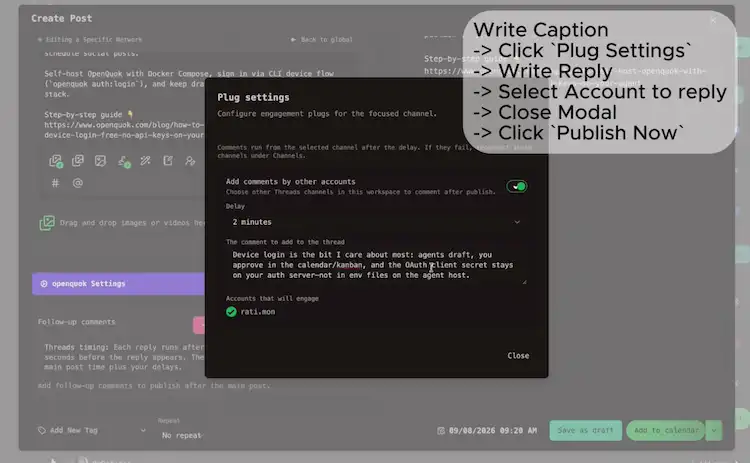
See Cross-account plugs for setup steps. OpenQuok runs plugs after the main post (and after Follow-up comments when configured).
Multi-channel and Global mode
In Global mode, one Follow-up comments program is copied to every selected Threads, X, Instagram, LinkedIn, and Facebook channel. The same text, delays, and media (where the network allows it) apply to each supported network.
When only one network should differ, focus that channel and customize — see Global vs per-channel. In per-channel mode, Follow-up comments edit only while a supported channel is focused.
Tip
If you remove every supported channel after adding Follow-up comments, OpenQuok does not block save — the rows stay in the draft but will not publish until a supported channel is selected again.
Write for every network
A safe pattern when several supported networks are selected together:
- Put must-have media on the main post so Instagram and LinkedIn still publish correctly (their Follow-up comments are text only)
- Use media on follow-up comment rows only on Threads, X, or Facebook when that channel is focused and the extra attachment is intentional
Agents, CLI, and API
Outside the dashboard, Follow-up comments live in providerSettingsByIntegrationId under each channel’s bucket (replies[] — Follow-up comments in the composer):
| Bucket | Reply array |
|---|---|
| Threads | threads.replies |
| X | x.replies |
| instagram.replies | |
| linkedin.replies | |
| facebook.replies |
Each entry uses message and delaySeconds. On networks that allow media on Follow-up comments, add media (flat array or media.items — same shapes as the main post). Upload files for Follow-up comments with openquok upload before posts:create; main-post -m does not attach to follow-up comment rows automatically.
Copy-paste recipes:
- CLI examples — Threads — text and media on threads.replies[]
- CLI examples — X — up to four images per x.replies[] row
- CLI examples — Facebook — one image per facebook.replies[] row
- CLI examples — Instagram — text-only instagram.replies[]
- CLI examples — LinkedIn — text-only linkedin.replies[]
Agent JSON examples (replace placeholders, then openquok posts:create --json …): threads-follow-up-reply-with-image.json, x-follow-up-reply-with-image.json, and facebook-follow-up-comment-with-image.json in agent/skills/openquok-core/resources/examples/.
See Managing posts and Provider settings for request shapes.