Getting Started for Using Public API
Getting started to automate your Social Scheduling with OpenQuok's public API and Node.js SDK.
Connect your agent today
Draft from chat, review in your calendar, and publish only what you approve.
Authentication
All programmatic access to /api/v1/public/* uses a Bearer token with the opo_ prefix in the Authorization header.
Programmatic access token
For scripts, CI, and your own integrations, use a programmatic access token tied to your workspace:
- In the OpenQuok app, go to Account → Settings → Developers → Access.
- Click Generate / Rotate token. The plaintext opo_… value is shown once — copy it immediately.
- Send it on every request:
curl -H "Authorization: Bearer opo_your_programmatic_token" https://api.openquok.com/api/v1/public/integrationsTokens belong to the workspace you selected. Rotate from the same panel when you need a new token. It is noted that previously issued tokens stop working after rotation.
Tip
Prefer openquok auth:login (device OAuth) when a browser is available. It stores an opo_ token without pasting secrets. For headless hosts, set OPENQUOK_API_KEY to the same opo_ value. See CLI authentication.
Tip
Cursor, Claude Code, Codex, and other MCP hosts can connect directly to OpenQuok over HTTP streaming with your opo_ token — no CLI skill required. See MCP introduction and copy snippets from Developers → Access in the dashboard.
OAuth2 access token (third-party apps)
If you are building an app for other OpenQuok users, register an OAuth app under Developers → Apps and use the OAuth2 Authorization Code flow. The returned access_token also uses the opo_ prefix and is sent the same way:
curl -H "Authorization: Bearer opo_your_oauth_token" https://api.openquok.com/api/v1/public/integrationsOAuth tokens are scoped to the organization the user authorized — not to the developer who built the app.
Base URL
| Environment | Base URL |
|---|---|
| OpenQuok Cloud | https://api.openquok.com/api/v1/public |
| Self-hosted | Your BACKEND_DOMAIN_URL origin + /api/v1/public |
The path prefix /api/v1 is configurable via API_PREFIX.
Rate limits
Warning
A 30 requests per hour limit applies per opo_ token across all /api/v1/public/* endpoints on OpenQuok Cloud. This does not mean you can only post 30 times per hour — each API call counts as one request, so schedule multiple posts in a single request (for example a multi-channel post group) to maximize throughput. Public API access requires a paid workspace plan; scheduled posts still count toward your monthly post quota. OpenQuok bills workspaces, not per-post credits. See cloud limits for every cap.
Public API documentation
Use your workspace token, then read provider settings, HTTP endpoints, and OAuth for third-party apps.
Supported social channels
Every connected channel goes through the same POST /api/v1/public/posts endpoint — provider-specific tuning lives under providerSettingsByIntegrationId keyed by the channel’s UUID.
For per-channel settings, copy-paste API examples, and the channel vs integration terminology used across the dashboard and API — see Provider settings.
Generate Output
Skip hand-writing JSON — open the Payload Wizard on the posting API landing page (sample channels, no account required) or the full workspace Payload Wizard after you sign in.
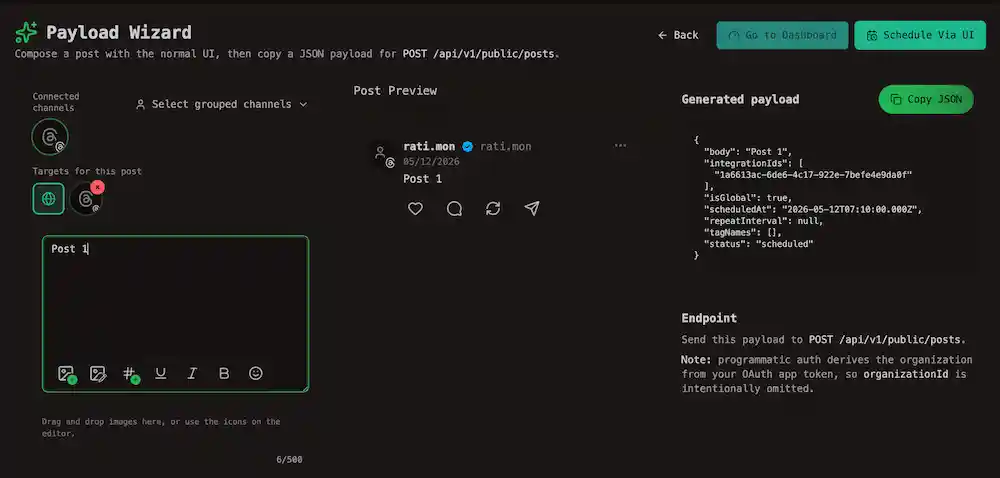
It’s the same post editor you already use in the OpenQuok app, but the schedule buttons are swapped for Copy scheduled payload and Copy draft payload, so you can drop the result straight into a POST /api/v1/public/posts request body.
Channel groups
Workspaces can organize connected channels into channel groups (the dashboard calls them customers). Use them to scope list and calendar queries to one client or brand.
| Action | HTTP | SDK |
|---|---|---|
| List groups | GET /public/groups | listGroups() |
| List channels in a group | GET /public/integrations?group= | integrations() with group |
# List channel groups, then filter integrations to one group
curl -H "Authorization: Bearer opo_your_programmatic_token"
  https://api.openquok.com/api/v1/public/groups

curl -H "Authorization: Bearer opo_your_programmatic_token"
  "https://api.openquok.com/api/v1/public/integrations?group=<channel-group-id>"
The same group filter is available on GET /public/posts/list via customerGroupId — see List Posts.
CLI equivalent
openquok integrations:groups lists groups; openquok integrations:list --group <channel-group-id> filters channels. See CLI integrations.
Plugs
Plugs automate engagement after a post goes live (auto-replies, cross-account comments, reposts when a likes threshold is met). They are available on paid plans.
| Type | Scope | Configure via |
|---|---|---|
| Internal plugs | Per post (compose time) | providerSettingsByIntegrationId on POST /public/posts |
| Cross-account plugs | Per post (compose time) | providerSettingsByIntegrationId on POST /public/posts |
| Global plugs | Per channel (account rules) | Plug endpoints below |
Internal plugs run once after publish — for example a same-account Threads delayed engagement reply. Set them in the create-post payload; see Threads Settings → Internal plugs and Internal plugs.
Cross-account plugs let another connected channel comment, repost, or reshare after publish. Set them in the same create-post payload; see Threads Settings → Cross-account plugs, X Settings → Cross-account plugs, LinkedIn Settings → Cross-account plugs, Cross-account plugs, and the Threads CLI examples.
Global plugs are saved rules on a channel (e.g. auto-repost when likes ≥ 100). The orchestrator re-checks every 6 hours, up to 3 times per post.
| Action | HTTP | SDK |
|---|---|---|
| Catalog (field names per provider) | GET /public/plug-catalog | getPlugCatalog() |
| List saved rules on a channel | GET /public/integration-plugs/:id | listIntegrationPlugs(integrationId) |
| Create or update a rule | POST /public/integration-plugs/:id | upsertIntegrationPlug(integrationId, body) |
| Delete a rule | DELETE /public/plugs/:plugId | deleteIntegrationPlug(plugId) |
| Enable or disable a rule | PUT /public/plugs/:plugId/activate | setIntegrationPlugActivated(plugId, activated) |
# Discover plug types for Threads, then upsert a global rule
curl -H "Authorization: Bearer opo_your_programmatic_token"
  https://api.openquok.com/api/v1/public/plug-catalog

curl -X POST -H "Authorization: Bearer opo_your_programmatic_token"
  -H "Content-Type: application/json"
  https://api.openquok.com/api/v1/public/integration-plugs/<integration-id>
  -d '{"func":"autoPlugPost","fields":[{"name":"likesAmount","value":"100"},{"name":"post","value":"Thanks for reading!"}]}'
Not every provider exposes plugs — Threads, X, and LinkedIn Page support global rules; Instagram and TikTok do not. Provider-specific behavior is documented under Social integration.
Start Integrating with SDK
@openquok/node-sdk is a small, typed Node.js wrapper around OpenQuok's programmatic API (/api/v1/public). Use it to schedule posts, manage post groups, upload media, list channel groups, configure global plugs, and inspect connected channels from any Node.js script or backend.Installation
npm install @openquok/node-sdkQuick guide
Note
Pass your programmatic opo_ token (from Developers → Access, or from OAuth for third-party apps) as the first argument to the Openquok constructor — it is sent as the Authorization header on every request.
import Openquok from '@openquok/node-sdk';

const openquok = new Openquok('opo_your_programmatic_token', {
	// optional (defaults shown)
	baseUrl: 'https://api.openquok.com',
	apiPrefix: '/api/v1'
});

await openquok.isConnected();

// List channel groups, then channels in the first group
const groups = await openquok.listGroups();
const channels = groups[0]
	? await openquok.integrations({ group: groups[0].id })
	: await openquok.integrations();

// Upload a file. Small files use POST /public/upload; larger videos
// automatically use direct-to-storage multipart (same return shape).
const uploaded = await openquok.upload(fileBuffer, 'png');

// Create a scheduled post
const created = await openquok.post({
	scheduledAt: new Date().toISOString(),
	status: 'scheduled',
	body: 'Hello from OpenQuok SDK',
	media: uploaded?.data?.id && uploaded?.data?.filePath
		? [{ id: uploaded.data.id, path: uploaded.data.filePath }]
		: undefined,
	integrationIds: [channels[0]?.id].filter(Boolean)
});

// Move the group to a new slot (post row id from created.data.posts[0].id)
const postRowId = created?.data?.posts?.[0]?.id;
if (postRowId) {
	await openquok.reschedulePost(postRowId, {
		scheduledAt: '2026-06-15T14:30:00.000Z',
		action: 'update'
	});
}

// Configure a global plug on a Threads channel (auto-reply at 100 likes)
const threadsChannel = channels.find((c) => c.identifier === 'threads');
if (threadsChannel) {
	await openquok.upsertIntegrationPlug(threadsChannel.id, {
		func: 'autoPlugPost',
		fields: [
			{ name: 'likesAmount', value: '100' },
			{ name: 'post', value: 'Thanks for reading!' }
		]
	});
}
For the full method table — posts, integrations, plugs, analytics, notifications, and more — see the SDK README (current release: @openquok/node-sdk@0.0.13).
References
Related Section(s)
Every Public API section plus CLI, MCP, and dashboard platform limits.