X (Twitter)
How to configure X for OpenQuok — OAuth 1.0a, backend env, and developer portal settings.
Connect your agent today
Draft from chat, review in your calendar, and publish only what you approve.
Overview
X publishing uses OAuth 1.0a (not OAuth 2). You need an X developer app with Read and Write permissions, a Native App type, valid OAuth redirect URIs, and backend env vars X_API_KEY and X_API_SECRET.
Warning
CLI walkthroughs: CLI Examples — X.
Features
Supported
| Feature | Details |
|---|---|
| Text posts | Weighted 280 characters (standard); 4000 when Verified is enabled on the connected channel (X Premium) |
| Image posts | Up to four images per tweet |
| Video posts | One video per tweet (≤ 140 seconds validated in the composer) |
| Who can reply | following, mentionedUsers, subscribers, or verified via compose settings |
| Community posts | Optional community URL (parsed to community_id at publish) |
| Content labels | Made with AI and Paid partnership toggles |
| Thread replies | Scheduled quote-less replies via x.replies[] with per-reply delaySeconds |
| Thread finisher | Closing reply via x.enabled and x.message |
| Platform analytics | Account timeline: likes, replies, reposts, quotes, impressions (unless DISABLE_X_ANALYTICS is true) |
| Per-post analytics | Public metrics for a published tweet when the post row has a release_id |
| Channel plugs | Auto-repost and auto-plug when like thresholds are met |
| Cross-account repost plug | Repost from other connected X channels after publish (x-repost-post-users) |
| @-mention lookup | Unlock the X channel in custom mode, type @ plus at least two characters (or use the toolbar @ button), then pick from suggestions — backed by POST /integrations/mentions |
| OAuth connect | OAuth 1.0a single-step flow; long-lived tokens (reconnect on auth errors) |
Not supported
| Feature | Notes |
|---|---|
| OAuth 2 / PKCE | OpenQuok uses OAuth 1.0a only for X |
| Polls, quote tweets, X Articles | Not implemented |
| Mixed image + video | One media mode per post: up to four images or one video |
| Automatic token refresh | No refresh cron; reconnect the channel when X returns auth errors |
Backend environment
OpenQuok reads X credentials only through backend/config/GlobalConfig.ts (populated via getEnv from backend/config/envHelper.ts).
Copy the X block from backend/.env.development.example into backend/.env.development.local, fill values, then restart the backend process:
# X (Twitter) — OAuth 1.0a Native App (Read + Write).
# Redirect URI on the app must match: {FRONTEND_DOMAIN_URL}/integration/oauth/x
X_API_KEY=""
X_API_SECRET=""
# Set to true to hide X analytics in API responses and dashboards.
DISABLE_X_ANALYTICS=false| Variable | Description |
|---|---|
| X_API_KEY | API Key (Consumer Key) from the X developer portal |
| X_API_SECRET | API Secret (Consumer Secret) |
| DISABLE_X_ANALYTICS | When true, X analytics endpoints return empty series (connected X channels may still appear in the analytics UI) |
The frontend base URL used for OAuth redirects comes from FRONTEND_DOMAIN_URL.
OAuth redirect URI
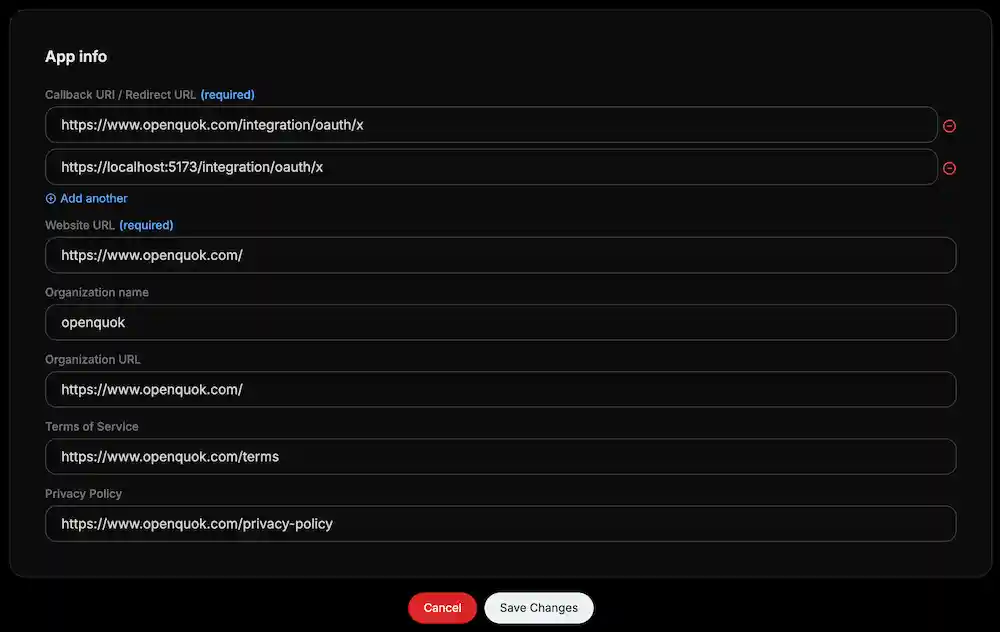
X redirects the browser back to your web app after consent. The backend builds the redirect from FRONTEND_DOMAIN_URL plus /integration/oauth/x.
https://YOUR-FRONTEND-DOMAIN/integration/oauth/xFor local development with HTTPS (recommended):
https://localhost:5173/integration/oauth/xX developer app setup
Create a project and app
Open the X developer portal
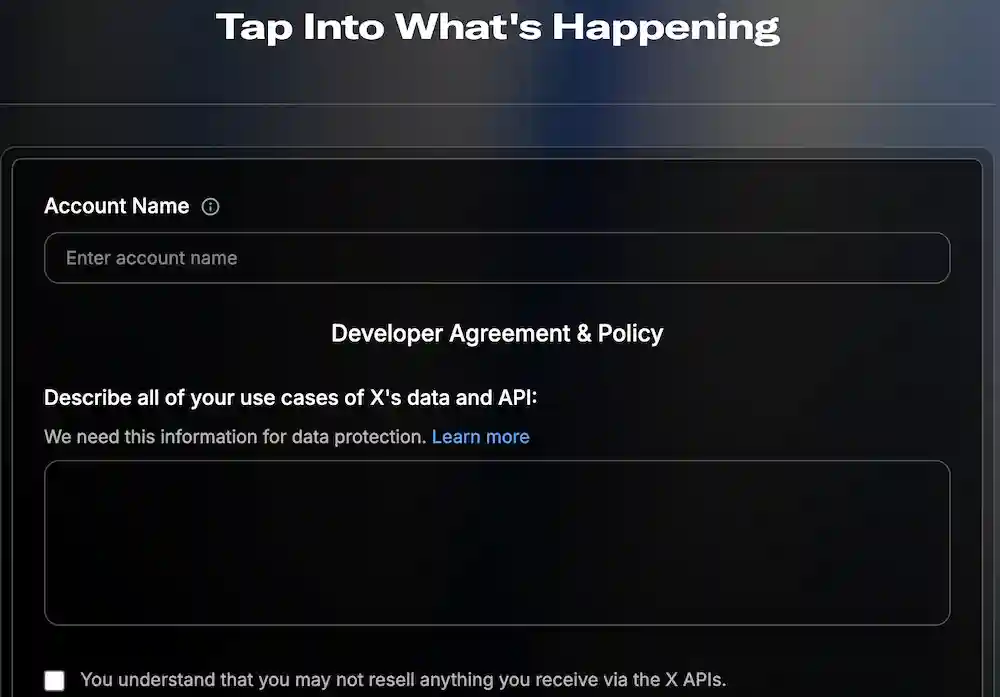
Then, submit the form and the project will be created.
Set up authentication
In Developer Console → Apps -> Settings:
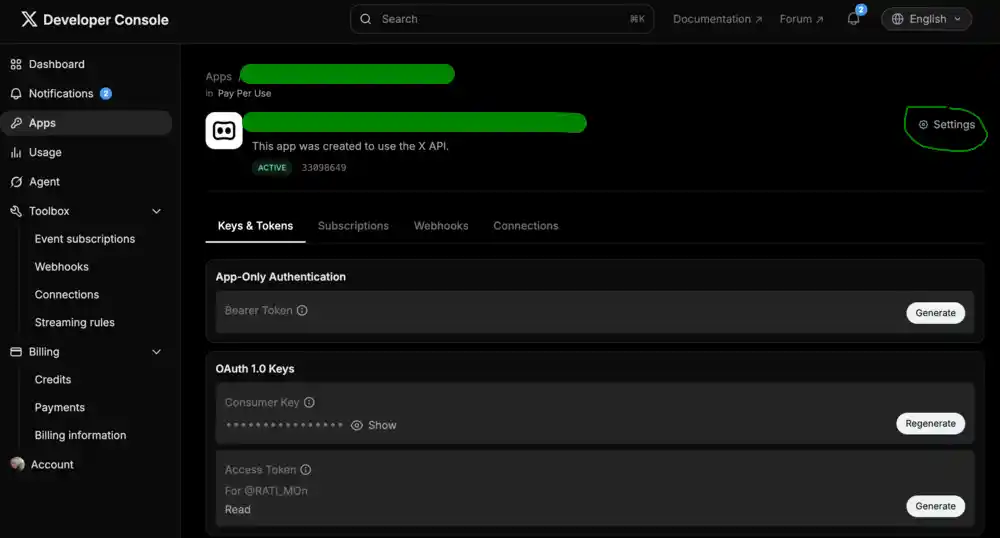
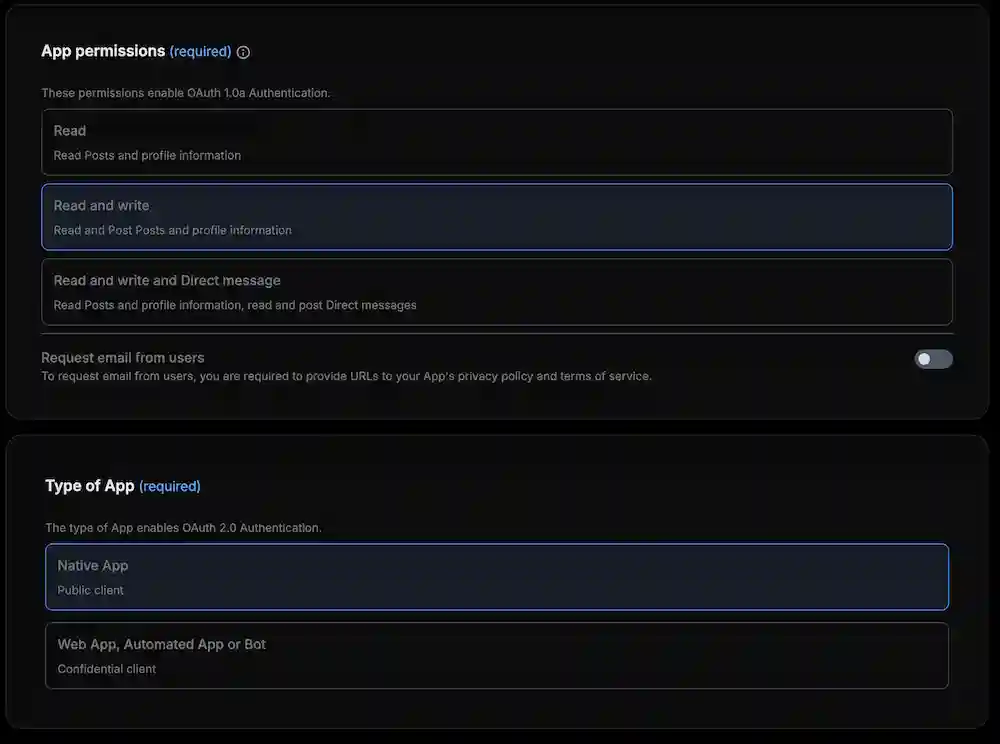
App permissions: Read and Write
Type of App: Native App
Warning
Native App is required for OAuth 1.0a. Using Web App, Automated App or Bot can fail with error code 32
- Callback URI / Redirect URL: add the redirect URI (see OAuth redirect URI above)
Copy API keys
In Keys and tokens, open Consumer Keys and copy API Key and API Secret into X_API_KEY and X_API_SECRET.
Compose settings
Per-post options (composer or CLI) include:
| Setting | Keys |
|---|---|
| Who can reply | who_can_reply_post or x.whoCanReplyPost |
| Community | community / community_url or x.communityUrl |
| Made with AI | made_with_ai or x.madeWithAi |
| Paid partnership | paid_partnership or x.paidPartnership |
| Thread finisher | x.enabled, x.message |
| Thread replies | x.replies[] with delaySeconds |
Standard accounts use a 280 weighted character limit; enable Verified on the channel (in channel settings) for 4000 when the account has X Premium.