Dev.to
Connect Dev.to to OpenQuok with a personal API key — and schedule markdown articles.
Connect your agent today
Draft from chat, review in your calendar, and publish only what you approve.
Overview
Dev.to publishing uses a personal API key you paste in the dashboard. There is no operator-registered developer app and no backend env vars such as a client ID or secret. OpenQuok keeps the key on the server so workers can publish markdown articles through the DEV Community API.
CLI walkthroughs: CLI Examples — Dev.to.
Dashboard connect only
in the workspace . GET /api/v1/public/social/devto returns 400 — there is no public OAuth start URL for this channel.
How OpenQuok stores the API key
OpenQuok needs a reversible copy of the key to call DEV on your behalf (one-way hashing is not an option for publishing).
| Layer | What happens |
|---|---|
| Browser | You paste once in Add Channel. The key is not kept in localStorage or other client storage. |
| HTTP APIs | List, connect, and public integration responses omit token fields — the browser never reads the key back. |
| Database | The key is stored as AES-GCM ciphertext on the connected channel (when INTEGRATIONS_TOKEN_ENCRYPTION_KEY or SECURITY_SECRET is set) so the API and publish workers can decrypt it only when publishing, refreshing, or triggering tools. Treat it like a password. |
OpenQuok uses field-level encryption at rest for provider secrets when a server encryption key is configured. Protect that key and database backups the same way you protect other server secrets. If the Dev.to key leaks, rotate it in DEV Settings → Extensions, then reconnect the channel in OpenQuok.
Treat the key as a secret
Anyone with the key can publish as that Dev.to user. Rotate it in DEV Settings if it leaks, then reconnect the channel in OpenQuok.
Features
Supported
| Feature | Details |
|---|---|
| Connect | Personal API key from DEV Settings → Extensions |
| Article body | Markdown in the post editor (no separate markdown editor) |
| Title | Required; at least 2 characters |
| Tags | Up to 4 names |
| Cover image | Optional; recommended 1000×420 |
| Organization | Optional; publish under an organization the key can access |
| Series | Optional free-text name; Dev.to creates the series if missing |
| Canonical URL | Optional syndication URL |
| Analytics | Account and per-article page views, reactions, and comments (7 / 30 / 90 days) |
| Tools | tags and organizations via integrations:trigger |
| Body length | Up to 100,000 characters |
Not supported
| Feature | Notes |
|---|---|
| Operator OAuth app | No OpenQuok env keys; users paste their own API key |
| Public OAuth connect | Dashboard only |
| Follow-up comments | Not implemented |
Create an API key
Open DEV Settings → Extensions
Sign in to Dev.to and open Settings → Extensions.
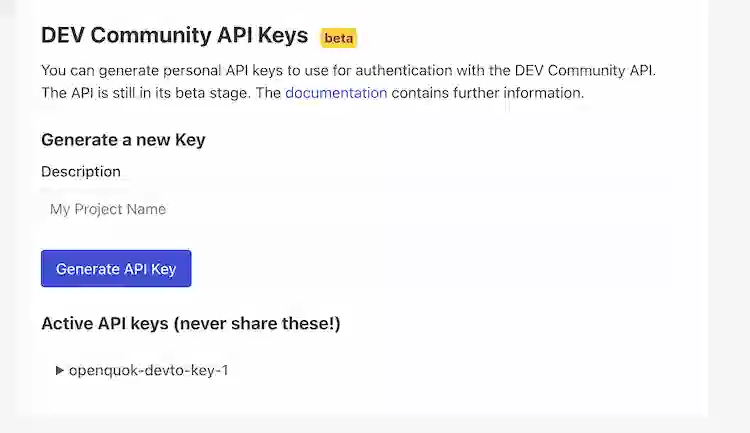
Generate a key
Create an API key. Copy it once — OpenQuok keeps it on the server for publishing after you paste it (see How OpenQuok stores the API key).
Connect in OpenQuok
In the workspace, choose Add Channel → Dev.to, paste the key, and connect. OpenQuok calls the DEV current-user endpoint to confirm the key, then saves the channel.
To refresh an existing channel, open the same credentials form (do not expect a platform OAuth redirect).
Compose settings
The post body is markdown. Title, tags, cover, organization, series, and canonical URL live in Dev.to settings (composer or CLI).
| Setting | Keys |
|---|---|
| Title | title or devto.title (required, min 2 characters) |
| Tags | tags — up to 4 names; strings or value/label objects |
| Cover | main_image / mainImage with a path from a prior upload |
| Canonical URL | canonical (aliases canonical_url, canonicalUrl) |
| Organization | organization (id; aliases organization_id, organizationId) |
| Series | series or devto.series — free-text name; creates the series on Dev.to if missing |
Discover the typed schema with openquok integrations:settings. List tag and organization options with openquok integrations:trigger tags and organizations.
Self-host
Dev.to needs no operator OAuth pair. Leave the social-app ID/secret rows in infra/self-host/.env.example unchanged. Users still paste an API key in the dashboard after the stack is up. See Self-host — Docker Compose.