MCP Client Setup
Configure Cursor, Claude Code, Claude Cowork, ChatGPT, Codex, VS Code, and other MCP clients to connect to OpenQuok HTTP streaming.
Connect your agent today
Draft from chat, review in your calendar, and publish only what you approve.
Quick setup from the dashboard
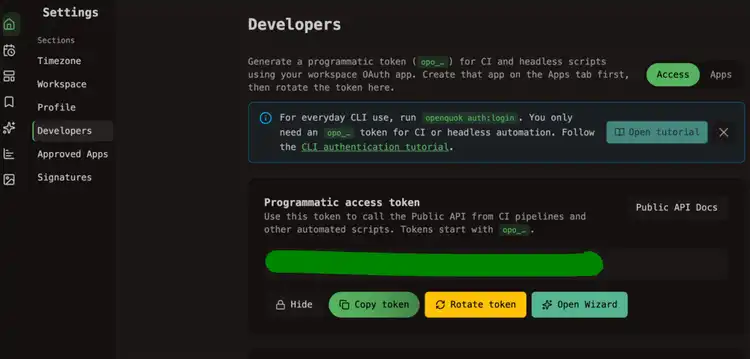
Generate a programmatic token
In the OpenQuok app, open Account → Settings → Developers → Access. Create your OAuth app on the Apps tab if needed, then generate an opo_… token.
Open MCP client configuration
Scroll to MCP client configuration on the same page. Choose Authorization header or API key in URL, pick your client, then Copy the snippet.
Paste into your MCP client
Follow the hint under the snippet (project .cursor/mcp.json, terminal command, etc.). Use Reveal before copying if you need to verify the token in the command.
Self-hosted
Replace https://api.openquok.com with your BACKEND_DOMAIN_URL origin. Align VITE_API_BASE_URL on the web app with the same API host in production.
Authentication methods
Authorization header (recommended)
- URL: https://api.openquok.com/mcp
- Header: Authorization: Bearer opo_your_programmatic_token
API key in URL
For clients that cannot send custom headers:
https://api.openquok.com/mcp/opo_your_programmatic_tokenPer-client snippets
The dashboard generator produces configs for these clients. Server name in JSON files is always openquok.
For step-by-step guides with troubleshooting, see MCP setup guides.
| Client | Config location | Guide |
|---|---|---|
| Claude Code | Terminal claude mcp add command | Claude Code |
| Claude Cowork | Custom connector or managedMcpServers entry | Claude Cowork |
| ChatGPT | Custom connector. Paste the MCP URL with your token. | ChatGPT |
| Cursor | .cursor/mcp.json | Cursor |
| VS Code / Copilot | .vscode/mcp.json | VS Code / Copilot |
| Devin Desktop | ~/.codeium/mcp_config.json | Devin Desktop |
| Amp | Terminal command or Amp settings.json | Amp |
| Codex | ~/.codex/config.toml | Codex |
| Antigravity CLI | ~/.gemini/config/mcp_config.json | Antigravity CLI |
| Warp | Settings → MCP Servers | Warp |
| Muse Code | ~/.config/muse/settings.json | Muse Code |
Cursor (header auth)
{
  "mcpServers": {
    "openquok": {
      "url": "https://api.openquok.com/mcp",
      "headers": {
        "Authorization": "Bearer opo_your_programmatic_token"
      }
    }
  }
}
Claude Code (header auth)
claude mcp add openquok
  --transport http
  --header "Authorization: Bearer opo_your_programmatic_token"
  "https://api.openquok.com/mcp"
Claude Code (path auth)
claude mcp add openquok --transport http --url "https://api.openquok.com/mcp/opo_your_programmatic_token"Verify connection
Ask your agent:
List my connected social media accounts
The agent should call integrationList and return channel names and IDs from your workspace.
Manual verification checklist
Run this checklist after copying a snippet from the dashboard. Use a workspace that already has at least one connected channel so integrationList returns real data.
Cursor
Paste the generated OpenQuok entry into .cursor/mcp.json.
Open Cursor settings or reload the workspace if the MCP server list does not refresh automatically.
Ask your agent:
List my connected social media accounts
Confirm the response includes your workspace channel names and IDs.
If it fails, switch the dashboard snippet between Authorization header and API key in URL and retry once.
Codex
Paste the generated entry into ~/.codex/config.toml.
Restart Codex or start a fresh session so it reloads MCP configuration.
Ask your agent:
List my connected social media accounts
Confirm the response lists channels from the same OpenQuok workspace that issued the token.
If it fails, verify the MCP URL still points at your current API origin and that the opo_ token was copied completely.
Claude Code
Run the generated claude mcp add command or update the existing OpenQuok server entry.
Start a new Claude Code session after the command succeeds.
Ask your agent:
List my connected social media accounts
Confirm Claude returns connected channel names and IDs from OpenQuok.
If it fails, run claude mcp list to verify the openquok server is registered, then retry with the alternate auth method if needed.