Warp
Connect OpenQuok MCP to Warp terminal via Settings → MCP Servers.
1 min read
Connect your agent today
Draft from chat, review in your calendar, and publish only what you approve.
Prerequisites
- Warp terminal with MCP support enabled.
- An OpenQuok programmatic token (opo_).
Setup
Generate your token
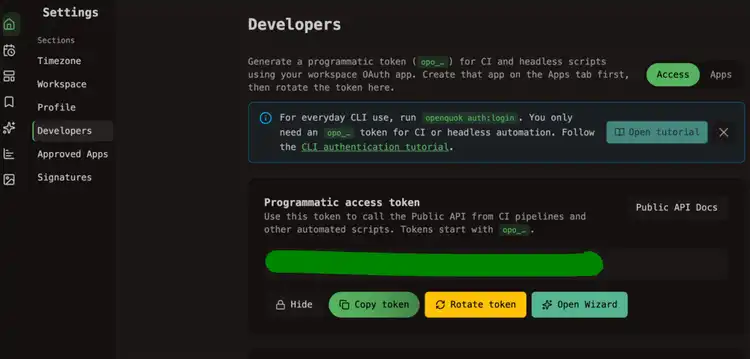
In the OpenQuok app, open Account → Settings → Developers → Access. Create an OAuth app if prompted, then generate an opo_… token.
Open MCP settings
In Warp, go to Settings → MCP Servers → + Add.
Paste the server config
Warp expects a top-level JSON object keyed by server name. Use openquok as the key:
Dashboard generator
Select Warp on the Developers → Access page to copy this JSON with your token already filled in.
Save and verify
Save the server entry. In Warp AI, ask:
List my connected social media accounts
Warp should call integrationList and list your channels.
Self-hosted API
Replace https://api.openquok.com with your BACKEND_DOMAIN_URL origin.