Codex
Connect OpenQuok MCP to OpenAI Codex via config.toml MCP server entries.
Connect your agent today
Draft from chat, review in your calendar, and publish only what you approve.
Prerequisites
- OpenAI Codex CLI installed.
- An OpenQuok programmatic token (opo_).
Configuration file
Codex reads MCP servers from ~/.codex/config.toml. Each server is a TOML table under mcp_servers.
Setup
Generate your token
In the OpenQuok app, open Account → Settings → Developers → Access. Create an OAuth app if prompted, then generate an opo_… token.
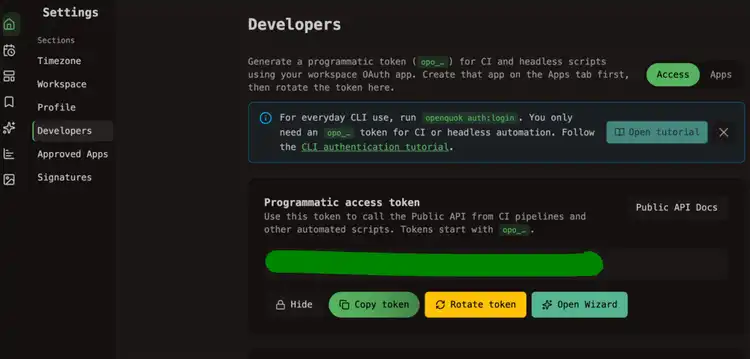
Add the OpenQuok server block
Append to ~/.codex/config.toml:
Restart Codex
Start a new Codex session so MCP configuration reloads.
Verify
Ask:
List my connected social media accounts
Codex should call integrationList and return workspace channels.
TOML quoting
Keep the Bearer value in double quotes inside http_headers. If auth fails after editing, confirm there are no smart quotes or line breaks inside the token string.
Self-hosted API
Set url to your BACKEND_DOMAIN_URL + /mcp.