Antigravity CLI
Connect OpenQuok MCP to Antigravity CLI via ~/.gemini/config/mcp_config.json.
Connect your agent today
Draft from chat, review in your calendar, and publish only what you approve.
Prerequisites
- Antigravity CLI (agy) installed.
- An OpenQuok programmatic token (opo_).
Configuration file
Antigravity CLI stores MCP servers in a dedicated mcp_config.json profile — not inline in settings.json. See Migrating from Gemini CLI (MCP config formatting) and CLI features (/mcp slash command).
| Scope | Path |
|---|---|
| Global | ~/.gemini/config/mcp_config.json |
| Workspace | .agents/mcp_config.json |
Remote HTTP servers must use serverUrl (not url or httpUrl) and should end with /mcp on your API host. Using the legacy url key can make the server appear connected but fail silently when tools run.
Migrating from Gemini CLI
Setup
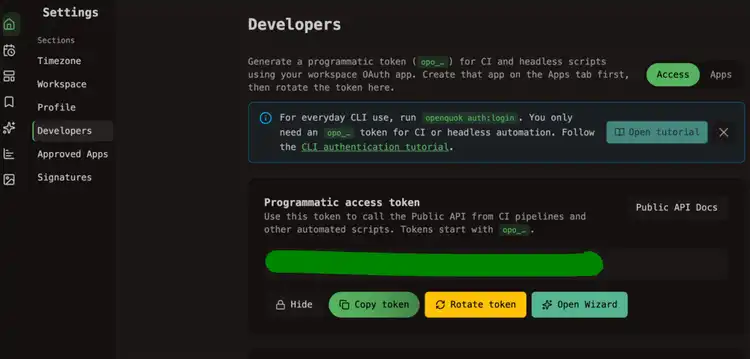
Generate your token
In the OpenQuok app, open Account → Settings → Developers → Access. Create an OAuth app if prompted, then generate an opo_… token.
Edit mcp_config.json
Create ~/.gemini/config/mcp_config.json if it does not exist, then add or merge the openquok block:
Restart the CLI
Exit and restart agy so the config is re-read.
Verify
Ask:
List my connected social media accounts
The CLI agent should call integrationList.
Self-hosted API
Set serverUrl to your BACKEND_DOMAIN_URL + /mcp.
For local development, that is often:
{
  "mcpServers": {
    "openquok": {
      "serverUrl": "http://localhost:3000/mcp",
      "headers": {
        "Authorization": "Bearer opo_your_programmatic_token"
      }
    }
  }
}