Hermes Agent
Install the openquok-core skill and OpenQuok CLI on a Hermes Agent host (Telegram, Discord, Slack, and more).
Connect your agent today
Draft from chat, review in your calendar, and publish only what you approve.
Prerequisites
- Shell access on the host where Hermes runs terminal commands (local machine, Docker, SSH, Daytona, or Modal).
- A working Hermes chat before adding skills — run hermes and confirm the agent responds.
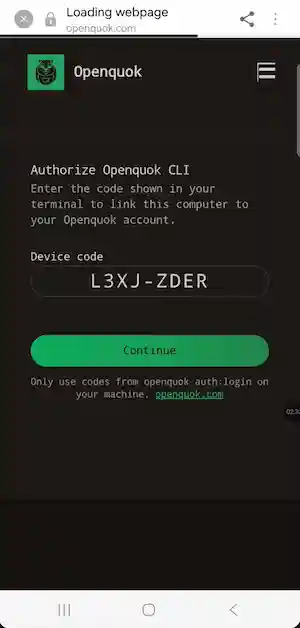
- For OAuth device login: you can authorize the sign-in link on your phone when the agent asks you to log in.
Installation
Install Hermes Agent
On Linux, macOS, WSL2, or Android (Termux):
curl -fsSL https://hermes-agent.nousresearch.com/install.sh | bash
source ~/.bashrc   # or source ~/.zshrc
On native Windows (PowerShell):
iex (irm https://hermes-agent.nousresearch.com/install.ps1)Then choose a provider — fastest path with Nous Portal:
hermes setup --portalOr run hermes model to pick Anthropic, OpenRouter, OpenAI, Gemini, or a custom endpoint. See the Hermes quickstart for provider tables and troubleshooting.
Connect a messaging gateway (optional)
After CLI chat works, connect Telegram, Discord, Slack, WhatsApp, or another platform:
hermes gateway setupCheck status with hermes gateway status. Messaging is optional for OpenQuok — the agent can draft and schedule from the terminal alone.
Install the global OpenQuok CLI
In the same environment Hermes uses for shell tools:
npm install -g @openquok/auto-cli@latest
openquok --version
Production auth uses the API at https://cli-auth.openquok.com and opens the browser on https://www.openquok.com/cli/device/verify.
CLI version update
Installing a skill or restarting Hermes does not change openquok --version. You need to update it yourself by running npm install -g @openquok/auto-cli@latest
Install the openquok-core skill
The skill file lives at agent/skills/openquok-core/SKILL.md in the monorepo. Hermes loads skills from ~/.hermes/skills/. Choose one install path:
Start a new Hermes session after install so skill descriptions reload. You should see ~/.hermes/skills/openquok-core/SKILL.md on disk. In the Hermes CLI, hermes skills list or /reload-skills confirms the skill is loaded.
Authenticate
Recommended (Telegram / messaging): device OAuth in two CLI steps — Hermes stops the shell after the first JSON from auth:login --json, so credentials are never stored unless you use --no-poll and a follow-up poll:
openquok auth:login --json --no-poll
# open verification_uri_complete on your phone → Authorize → tell the agent you're done
openquok auth:login:poll --device-code "<device_code from stdout>"
openquok auth:status
Alternative for fully headless hosts (VPS, Docker, Telegram bots): rotate a programmatic token from the OpenQuok dashboard (Account → Settings → Developers → Access):
export OPENQUOK_API_KEY=opo_your_programmatic_token
openquok auth:status
Confirm the agent can run commands
After auth:
openquok integrations:listHermes + messaging notes
- Start a new chat session after installing the skill or upgrading the CLI so Hermes reloads skills and checks openquok --version once at session start.
- If the agent reports an old CLI version after you upgraded, run command -v openquok and which -a openquok — another binary may be earlier on PATH.
- Hermes separates secrets (~/.hermes/.env) from config (~/.hermes/config.yaml). export OPENQUOK_API_KEY in your shell profile before starting hermes gateway.
- On Telegram, use auth:login --json --no-poll then auth:login:poll after you authorize on your phone — not auth:login --json alone.
- For posting with images in chat, the user must provide a file or an image URL for upload-from-url.
Real World Use case: Chat model vs image generation
Hermes uses two separate systems:
| Role | Configured via | Example |
|---|---|---|
| Main chat (Telegram, CLI, scheduling) | hermes model → model.default in ~/.hermes/config.yaml | claude-sonnet-4-6 |
| Image generation (on demand) | hermes tools → image_gen in config.yaml | fal-ai/nano-banana-pro via the image_generate tool |
Do not set an image-only model (for example gemini-3-pro-image) as your main Telegram model. Hermes will fail with Provider authentication failed.
Warning
Pick a capable chat model for model.default (for example claude-sonnet-4-6 on provider anthropic). Configure image generation separately under image_gen — the agent calls image_generate when the user asks for a picture, without changing the main model.
Set the main chat model
hermes modelPick Anthropic and a chat model such as claude-sonnet-4-6. The terminal handles credentials for you:
- OAuth — Claude Max plan with extra usage credits (Hermes routes as Claude Code; see the AI Providers guide).
- API key — paste your key when prompted. You can also run hermes auth add anthropic --type api-key or hermes config set ANTHROPIC_API_KEY sk-ant-... (saved to ~/.hermes/.env).
- Claude Code — if you already use Claude Code on the host, Hermes can auto-detect those credentials.
Hermes writes the result to ~/.hermes/config.yaml:
model:
  provider: anthropic
  default: claude-sonnet-4-6
If you use hermes setup --portal (Nous Portal) or OpenRouter instead, pick anthropic/claude-sonnet-4.6 with provider: nous or provider: openrouter — no separate Anthropic API key needed on Portal.
In an existing session you can switch with /model claude-sonnet-4-6 (native Anthropic) or /model anthropic/claude-sonnet-4.6 (aggregator).
See Configuring models and AI Providers for provider tables and auxiliary overrides.
Configure image generation
Image generation is not part of the OpenQuok skill. Set it up once:
hermes toolsOpen Image Generation, choose a backend:
- Nous Subscription — if you use hermes setup --portal (no separate FAL key).
- FAL.ai — add FAL_KEY to ~/.hermes/.env (get a key at fal.ai).
Pick your image model. For Gemini-class quality and text in images, a common choice is fal-ai/nano-banana-pro. For speed and low cost, the default fal-ai/flux-2/klein/9b is fine.
Hermes saves the selection to config.yaml:
image_gen:
  model: fal-ai/nano-banana-pro
  use_gateway: false
Set use_gateway: true when using Nous Subscription instead of a direct FAL key.
Then ask in Telegram or the CLI:
Generate a square image of a product hero shot on a clean white background
Hermes routes that to image_generate using the configured image_gen.model — your main chat model stays on Sonnet.
Full model list, aspect ratios, and editing: Hermes image generation.
Auxiliary models (optional)
Hermes can route side tasks (vision analysis, session titles, context compression) to a different model than main chat. Run hermes model → Configure auxiliary models, or edit the auxiliary: block in config.yaml.
Run on a VPS or serverless host
Hermes supports six terminal backends: local, Docker, SSH, Daytona, Singularity, and Modal. Mount a persistent ~/.hermes/ volume (or set HERMES_HOME), install openquok-core and the global CLI in the container shell, then authenticate.
On headless hosts prefer OPENQUOK_API_KEY or auth:login --json so the user opens verification_uri_complete on another device. See the Hermes installation guide for per-user vs root layout and service-account installs.
Troubleshooting
Outdated skill or CLI
Installing or updating the skill does not upgrade openquok --version. Run both updates in the same shell environment Hermes uses for terminal tools, then start a new chat session so Hermes reloads skills and the OpenQuok bot runs its opening checks again.
On the host (terminal)
hermes skills update openquok-core
npm install -g @openquok/auto-cli@latest
openquok --version
In Telegram (or another messaging gateway) — slash commands run in the chat, not in the shell:
/new
Starts a fresh conversation (alias /reset). Use this after upgrading so the OpenQuok skill re-reads openquok --version and auth:status on the first turn.
/sessions
Lists recent sessions so you can resume an older thread or confirm you are not still in a pre-upgrade chat. You can also run /resume <name> to jump to a named session. In the Hermes CLI, /reload-skills reloads skill metadata without a full reset when you only changed the skill file.
Skill not found
Confirm ~/.hermes/skills/openquok-core/SKILL.md exists. Install with hermes skills install (see Install the openquok-core skill) or update an existing copy with hermes skills update openquok-core. Start a new session — in Telegram send /new — then run /skills or hermes skills list to confirm the skill is loaded.
Invalid or expired code
The user must open the exact verification_uri_complete link from auth:login --json while the CLI is still polling. Codes expire in about 15 minutes. Pre-login at openquok.com alone does not validate the device code.
Warning
If Telegram shows Provider authentication failed while CLI chat works, the gateway is usually on a model your provider does not expose for chat (for example gemini-3-pro-image). Run hermes model and set a chat model such as claude-sonnet-4-6. Use hermes tools → Image Generation for pictures — see Chat model vs image generation above.